AI can invent a convincing snack packet that is completely wrong for the brand. Logos warp. Flavours change. Text becomes decoration. The packet grows between shots. For a product ad, those are not small faults; they break the reason for making the work.
The practical answer is to treat generation as one stage of production, not the final image.
See the finished Griffin’s — Life Needs a Snack ad, which combines generative imagery, 3D scene layouts, product photography and compositing. The case study explains how those production methods support recognisable products across the piece.
Planning a product ad? Download the free readiness checklist to organise packaging references, delivery versions and brand approvals. No signup is required.
Start with approved source material
Collect the current packaging artwork, clean product photography, mandatory marks, colour references, and a list of details that cannot change. Old packaging found in an image search should not become an accidental reference.
The client should confirm which source is authoritative. If several pack sizes or flavours appear, name each one in the shot list.
Decide where exactness matters
Not every frame needs a readable label. A distant background pack and a final product close-up have different jobs.
Classify shots before production:
- Hero product: shape, colour, logo, flavour, and text need close review.
- Recognisable product: silhouette and main brand cues matter, but small text may not be readable.
- Atmosphere: the product is not the evidence and should not be framed as a precise pack shot.
This keeps finishing effort focused on the frames viewers will inspect.
Build the scene before chasing detail
Camera position, blocking, lens feel, and the relationship between people and product should be resolved early. For Griffin’s — Life Needs a Snack, Lucid Lab used 3D scene layouts alongside character references, product photography, generative imagery, and compositing.
A layout cannot guarantee the final generation, but it gives the production a repeatable spatial target. It is easier to judge product scale and placement when the scene is not being reinvented on every attempt.
Use references for continuity
Create a small approved reference set for recurring people, wardrobe, locations, lighting, and products. Too many conflicting references can be as unhelpful as none.
For each new shot, compare against the approved set and the previous edited shot. Continuity is an editorial relationship, not just a prompt instruction.
Replace or composite critical product details
When a generated pack is close but not exact, the responsible choice may be to replace it with approved product photography or artwork in post. Compositing can also correct scale, perspective, edges, reflections, and contact shadows.
The aim is not to hide the use of AI. It is to prevent the generative stage from misrepresenting the product.
Artwork placement and foreground masking are separate jobs
This original local studio illustration shows two production decisions. No AI model was used. The carton coordinates were authored, not recovered by tracking real footage.
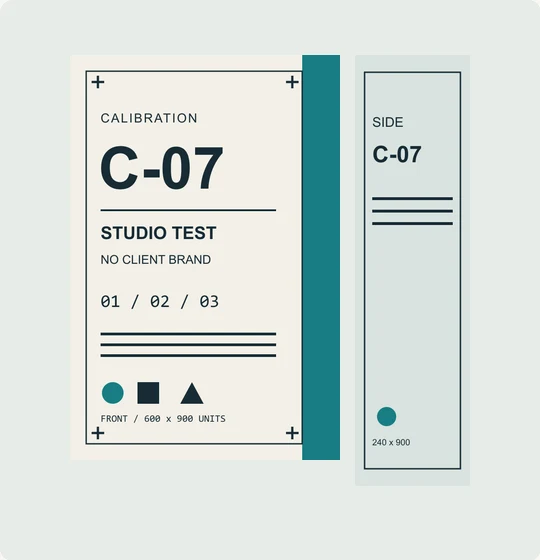
1. Start with the exact artwork. The front and side are separate original files, with distinct markings. This is a calibration prop, not client packaging.
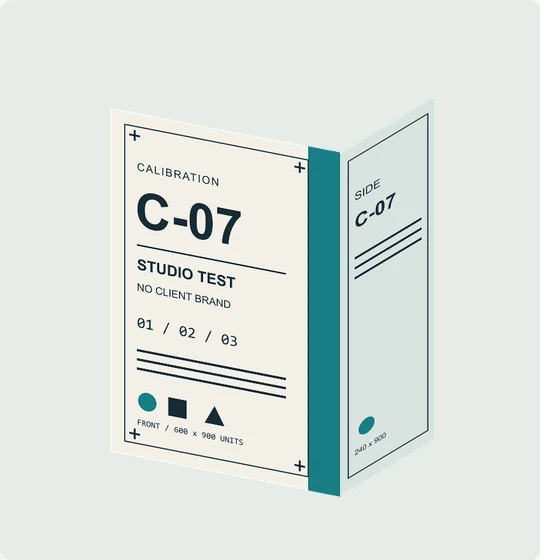
2. Place each face. This intermediate layer is reconstructed from the actual frame's recorded transforms and source artwork. It shows placement before the foreground is applied.
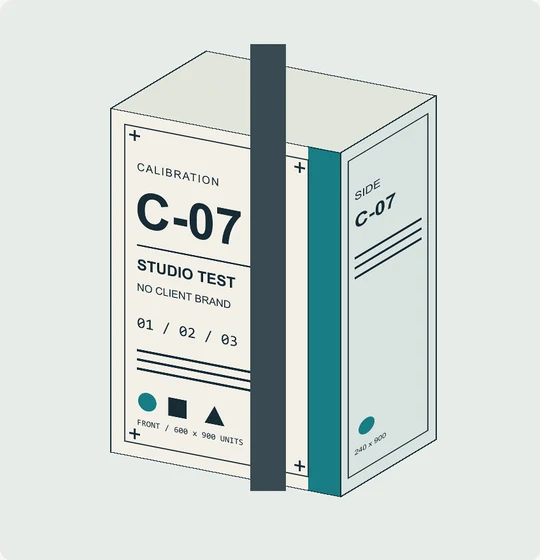
3. Preserve the foreground. In actual rendered frame 48, the strip covers the artwork behind it. Correct lettering alone does not resolve which object should appear in front.
For a real brief, supply current front and side artwork and identify shots where people or other objects cross the product. Review the moving edit as well as the pack details. Use the shot-review notes below to record both checks.
Review the moving image, not only still frames
Use the product-shot review worksheet below to record shot references, edit versions, checks and corrections. You can copy or download the notes for your review conversation.
A label can look correct on one frame and melt during motion. Review the shot at full speed and frame by frame around key moments. Check:
- Logo and pack shape through the movement
- Text changes or invented marks
- Hands and contact points
- Reflections, shadows, and scale
- Cuts that reveal a continuity jump
- Crops in every required aspect ratio
Keep a human approval gate
Before final delivery, the brand owner should approve product details in the actual edit. A contact sheet of hero frames can speed review, but it does not replace watching the finished sequence.
This workflow improves control; it does not make every concept equally suitable for AI. If exact documentary evidence or a flawless real-world demonstration is the core of the brief, traditional filming may be the better method.
Can AI show what the product actually does?
A recognisable pack and an accurate demonstration are different checks. A generated scene might preserve the logo while inventing how a product pours, stretches, breaks, operates or performs.
Separate these jobs in the brief:
- An imagined product world: agree which settings and actions are illustrative, and keep the actual product details anchored to approved references.
- A real demonstration: use filmed evidence of the product in use, or an explanation built from verified technical material. Check the sequence against the behaviour or result being claimed.
- A manufacturing explanation: give the production team an approved process order, diagrams and technical reviewer. Clearly distinguish an illustrative view inside a machine from a record of the actual factory.
New Zealand’s ASA guidance on AI use in advertising says AI-supported ads must remain truthful, with evidence for objective claims. Disclosure can help viewers understand synthetic imagery, but an AI label does not correct a misleading product impression.
For a new brief, bring both the visual references and the evidence behind any performance claim. That helps determine which shots can be imagined and which need filming or controlled animation.
Planning a product-led piece? See Lucid Lab’s AI advertising production process for the work, required inputs and approval stages. Then send the references and intended deliverables so Lucid Lab can judge where AI helps and where photography, 3D, animation, or live action should carry the shot.